Physical Address
304 North Cardinal St.
Dorchester Center, MA 02124

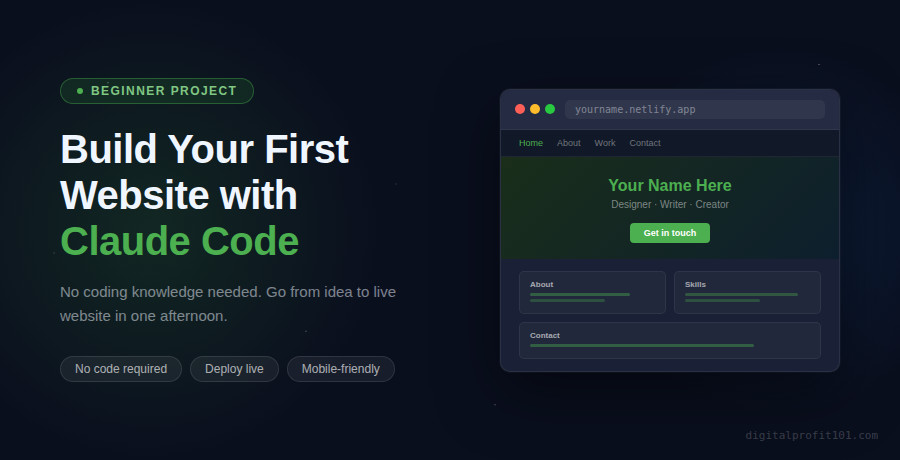
Build your first website with Claude Code — no coding needed
Build Your First Website with Claude Code (No Coding Needed)
Go from a blank page to a live, professional personal website in one afternoon — using only plain English instructions. No code required.
| SEO TARGET Primary: build website with Claude Code, no coding | Secondary: Claude Code website tutorial for beginners, create website with AI 2026 | Read time: ~10 min | Target: 2,000–2,400 words |
You do not need to know HTML. You do not need to know CSS. You do not need to understand what a ‘div’ is or how a flexbox works.
What you need is the ability to describe what you want – clearly, in your own words – and a tool that turns that description into a real, working website.
That tool is Claude Code. And in this guide, I am going to walk you through the entire process: from opening your terminal for the first time, to having a live personal website with a real URL you can share with anyone.
This is what we are building: a complete personal landing page – with a hero section, an about section, a skills section, a projects section, and a contact form – deployed live for free.
| Before you start, this guide assumes you have Claude Code installed and set up. If you have not done that yet, read the previous post: How to Install Claude Code (Step-by-Step, 2026) – then come back here. |
Before we dive in, here is a clear picture of the finished product and the time involved:
| What | Details |
| Project type | Personal landing page / portfolio website |
| Sections | Hero, About, Skills, Projects (4 cards), Contact form |
| Design | Modern, responsive – looks great on mobile and desktop |
| Technology | Plain HTML, CSS, and JavaScript – no frameworks needed |
| Hosting | Netlify (free plan) – live URL in under 5 minutes |
| Total time | 45 minutes to 1.5 hours for your first build |
The workflow is simpler than you might think. Here is the full picture:
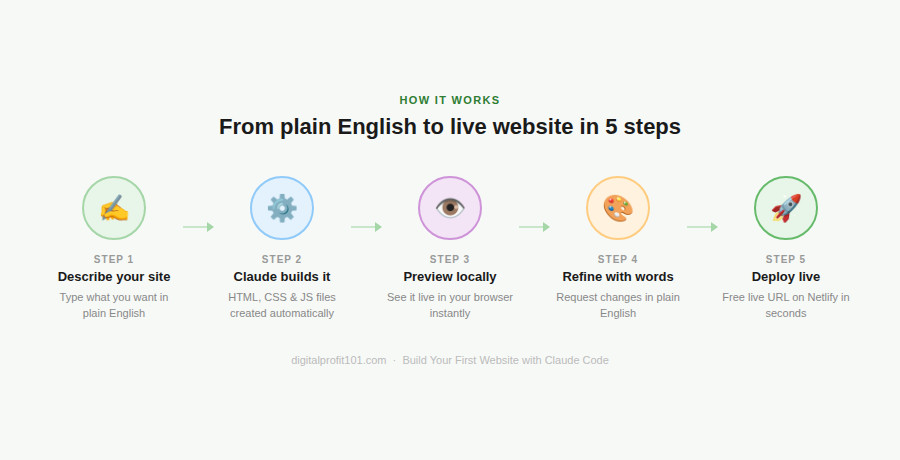
The 5-step process: describe → build → preview → refine → deploy
Every website needs a home on your computer. Create a dedicated folder and open Claude Code inside it:
| # Create your project foldermkdir my-website # Navigate into itcd my-website # Start Claude Codeclaude |
You should see the Claude Code welcome prompt. Now type /init and press Enter. This creates a CLAUDE.md file – a memory file that helps Claude Code remember your project preferences across sessions. It takes 10 seconds and saves you time later.
| What is CLAUDE.md?It is a plain text file Claude Code reads at the start of every session. Think of it as briefing notes you leave for Claude Code about your project. Once created, it automatically tells Claude Code your project name, your preferences, and your standards — so you do not have to repeat yourself. |
This is the step that feels almost too easy the first time you do it. You are going to describe your website in plain English, and Claude Code is going to build it.
Here is a strong, detailed prompt you can use – just swap in your own information:
| Your website-building prompt – copy and customise thisBuild a beautiful personal landing page website for me. My name is [Your Name]. I am a [your role – e.g. freelance designer/marketing consultant/content creator]. Include these sections:— Hero: my name as the main heading, a short tagline below it, and two buttons: ‘View My Work’ and ‘Get In Touch’— About: a short paragraph about who I am and what I do— Skills: a grid of 6 skill cards with icons and labels— Projects: 4 project cards, each with a title, short description, and a link button— Contact: a form with name, email, and message fields, plus my email address below it Design requirements:— Colour scheme: dark navy (#0D1B2A) background, white text, with bright teal (#00B4D8) as the accent colour— Font: use Google Fonts – ‘Poppins’ for headings, ‘Inter’ for body text— Sticky navigation bar that highlights the current section as the user scrolls— Smooth scroll when navigation links are clicked— Fully responsive – must look perfect on mobile, tablet, and desktop Use only HTML, CSS, and vanilla JavaScript. No frameworks or libraries needed. |
Watch what Claude Code does after you send this. Over the next 30–60 seconds, you will see it:
| It might ask you questionsIf your prompt is missing something important (like your colour preference or a section detail), Claude Code may ask a clarifying question before building. Answer it directly in the chat – Claude Code will use your answer and continue. This is normal and good. |
Before we move on, let’s talk about the most important skill in this entire guide: writing specific prompts.
Most beginners try Claude Code for the first time with vague instructions. The result is a generic, forgettable website that feels like a template. Here is what that looks like – and what to do instead:
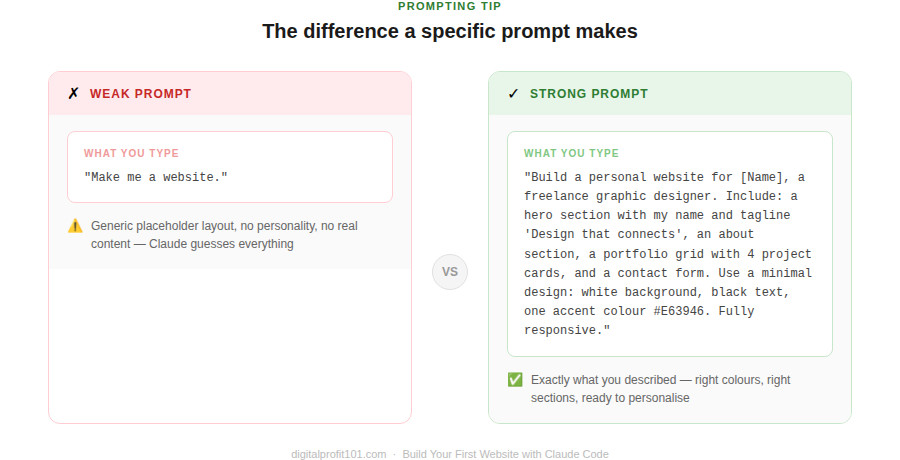
Specific prompts produce specific results — vague prompts produce generic ones
The rule is simple: the more specific your description, the more exactly Claude Code can match what you have in mind. Think about each of these elements when you write your prompt:
| Element | Example of a specific instruction |
| Colour scheme | White background, black text, one accent colour: #E63946 |
| Typography | Use Google Fonts: Playfair Display for headings, Lato for body text |
| Layout | 3-column grid on desktop, single column on mobile |
| Sections | Hero, About (with a photo placeholder), Portfolio (6 items), Contact |
| Tone | Clean and minimal – no decorative elements, generous whitespace |
| Functionality | Sticky nav, smooth scroll, mobile hamburger menu |
Once Claude Code finishes building, you need to see it in a browser. Ask Claude Code to start a local preview server:
| Start a local server so I can preview my website in the browser |
Claude Code will run one of the following commands automatically – you do not need to type it yourself:
| # Claude Code will choose one of these:npx serve .python3 -m http.server 8000npx http-server |
It will tell you which URL to open – usually http://localhost:8000 or http://localhost:3000. Open that address in your browser. Your website is now running locally on your machine.
| What ‘local’ meansA local server means the website is running on your computer only — it is not yet on the internet. This is your private preview. Nobody else can see it yet. You will make it public in Step 5. |
This is where Claude Code truly shines. You are not locked into the first result. You can keep giving instructions in plain English to refine, adjust, and improve your website – as many times as you like.
Here are some examples of the kinds of refinements you can request:
| The hero section feels too dark. Lighten the background to a deep blue (#1B263B)and make the heading text 10% larger. |
| Add a ‘Back to top’ button that appears after the user scrolls down 400 pixels.Position it in the bottom-right corner. Style it to match the accent colour. |
| On mobile, the navigation links are too close together and hard to tap. Increase the spacing between them and make sure the hamburger menu closes automatically after a link is clicked. |
| Replace the four project cards with these real projects:1. Brand Refresh — Redesigned brand identity for a Lagos-based restaurant. E-commerce Site — Full Shopify store for a skincare brand, 3x conversion rate. Social Campaign — Instagram campaign that reached 200k accounts organically. Annual Report — 48-page designed report for a non-profit organisation |
| Iterate freely – there is no limit. You can send as many refinement instructions as you want. Each one is processed in the context of what already exists. Claude Code reads your files, makes only the changes you requested, and leaves everything else untouched. This is how professionals use it: build a solid foundation with the first prompt, then refine with targeted instructions. |
Your website exists on your computer. Now let’s put it on the internet with a real URL you can share. The fastest free option is Netlify Drop – no account required for your first deployment.
That URL is live on the internet. Anyone in the world can visit it. You can share it immediately.
If you plan to update your website regularly, deploy through Claude Code using the Netlify command-line tool:
| Install the Netlify CLI and deploy this project to Netlify.Walk me through the steps. |
Claude Code will install the Netlify CLI, guide you through creating a free account (if you do not have one), and deploy your site – all from the terminal. Future updates are then a single command.
| Set up a Git repository for this project and deploy it to GitHub Pages.Walk me through the full process. |
Claude Code will initialize a Git repository, push your code to GitHub, and enable GitHub Pages – giving you a free, permanent URL at yourusername.github.io/my-website.
| Custom domainOnce your site is live on Netlify or GitHub Pages, you can connect a custom domain (like yourname.com) through your domain registrar’s DNS settings. Ask Claude Code: ‘Walk me through connecting a custom domain to my Netlify site’ – it will give you step-by-step instructions. |
Once your basic site is live, here are some features worth adding. Each is a single instruction to Claude Code:
| Add a dark/light mode toggle button in the navigation bar.Save the user’s preference in localStorage so it persists across visits. |
| Add scroll-triggered fade-in animations to each section. Each section should fade in from below as the user scrolls to it. Use the Intersection Observer API – no external libraries. |
| Make the contact form actually send emails using Formspree. The form should be sent to [your email address]. Show a success message after submission and clear the form fields. |
| Add a blog section to the website with 3 sample articles. Each article should have a title, date, category tag, and excerpt. Include a ‘Read more’ link for each one. Style it consistently with the rest of the site. |
| Optimize this website for performance. Compress images, minify CSS and JavaScript, add lazy loading to all images, and make sure it scores above 90 on Google PageSpeed Insights. Tell me what changes you made and why. |
| Problem | Fix |
| The contact form does nothing on submit | Ask Claude Code: ‘The website is not displaying correctly. Look at the browser console for errors and fix them.’ |
| Mobile layout is broken | Ask: ‘The mobile layout is broken. Check the CSS media queries and fix the responsive design.’ |
| Google Font is not loading | Ask: ‘The Google Font is not loading. Check the font import and fix it.’ |
| Contact form does nothing on submit | Ask: ‘The contact form does not submit. Add Formspree integration so it sends to [your email].’ |
| Netlify shows a blank page | Make sure you dragged the folder itself, not just the files inside it. Try again with the whole folder. |
| Changes not showing after refresh | Hard refresh your browser: Cmd+Shift+R (Mac) or Ctrl+Shift+R (Windows). |
Think about what just happened. You had an idea. You described it in plain English. Claude Code translated that description into real HTML, CSS, and JavaScript files. You previewed it, refined it, and deployed it to a live URL on the internet.
No tutorials on HTML syntax. No debugging CSS flexbox for two hours. No, watching YouTube videos explaining what a CDN is. You described, reviewed, refined, and shipped.
That is the shift Claude Code represents – and you have just experienced it first-hand. The same workflow you used to build this landing page will scale to complex web applications, REST APIs, full-stack SaaS products, and anything else you want to build.
| What to read next. Now that you can build websites, the next step is learning how to write better prompts – so every project you build comes out exactly the way you imagined it. Read: The CRISP Prompting Framework – Get Better Results from Claude Code → |
| Go deeper with the book. This tutorial covers Chapter 3 of How to Use Claude Code to Create Anything by Ifeyinwa C. Ofulue. The book goes much further – REST APIs, full-stack apps, AI-powered features, and a complete SaaS product from scratch. Available now on Selar. |
Ifeyinwa C. Ofulue is a writer, web developer, UX designer, digital product creator, and researcher focused on AI tools, automation, UX design, and online business systems. He is the author of How to Use Claude Code to Create Anything and several other digital guides on online income, AI tools, and building profitable digital products. He helps beginners learn how to create digital products, build profitable websites, and use modern AI tools to generate income online. Find his work at digitalprofit101.com.
Through this website, I share practical tutorials, step-by-step guides, and proven strategies on topics such as AI productivity tools, website monetization, digital marketing, and automation.
My mission is simple: to make online business and digital skills accessible to anyone willing to learn.
When I’m not researching new web designs, AI tools, or writing tutorials, I focus on building scalable online systems and testing new ways to help creators earn online.
👉 Learn more about Ifeyinwa on the About page.